 GenModelHub
How to Make the Hotel Lobby AI Video With Your Cat or Dog (2026)
Updated 2026-10-18
The Hotel Lobby cat video is the AI version of the orange-booth duet in which two cats stand side by side at a single hanging microphone and trade the rap, hand moves and cuts of the original studio performance. The format started with exactly this joke – videos of two cats recreating Quavo and Takeoff's "Hotel Lobby" – and you can make your own with two photos of your pets, or one pet and one person, in the Hotel Lobby AI generator from GenModelHub, which runs in a phone browser. GenModelHub is not affiliated with Quavo, Takeoff or COLORS.
How to make it with GenModelHub (3 steps)
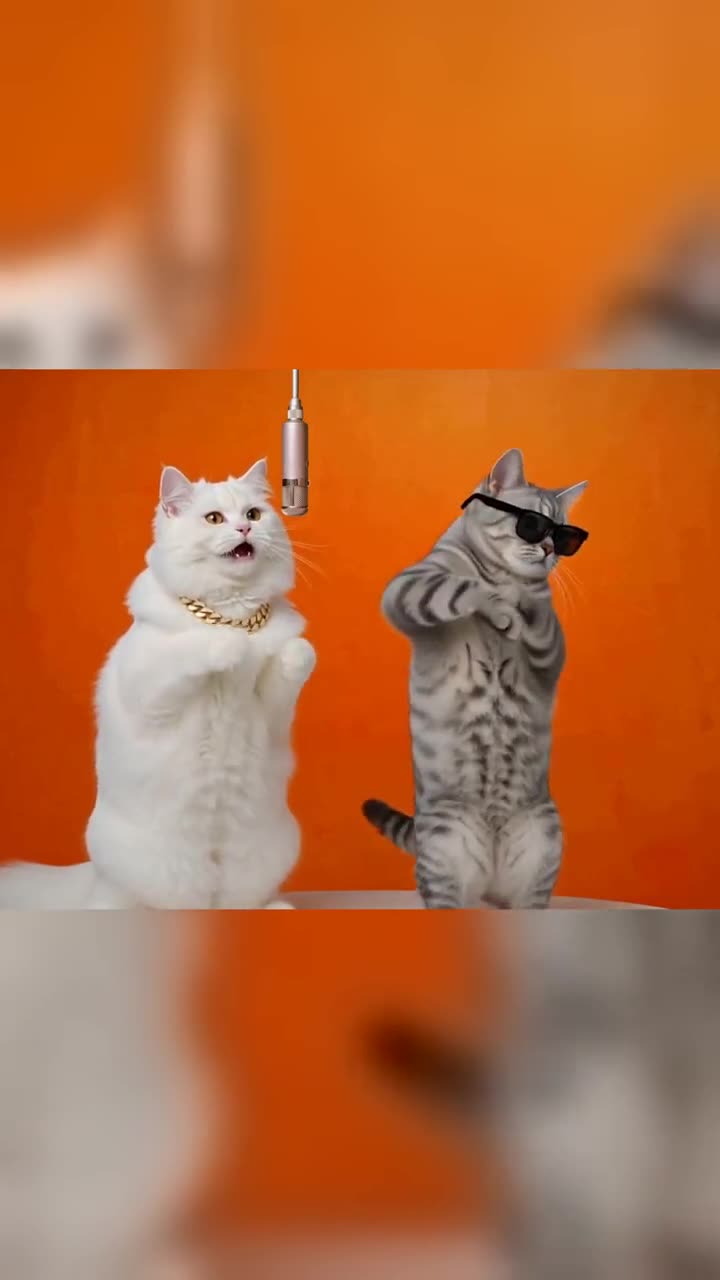
- Pick the effect. Open the Hotel Lobby AI generator in your phone or desktop browser. There is nothing to install and no prompt to write.
- Upload two photos. Tap the left box and add the first pet, tap the right box and add the second pet (or the owner). The left photo becomes the left performer, the right photo the right performer. Allow one minute to choose and upload.
- Press "Make our orange booth battle". Generation takes a few minutes. Then download the 15-second MP4 and add the sound inside TikTok or Instagram.
Which photos to use for a pet video
This is the part that decides whether the clip looks good. Use this checklist:
- Two photos, one animal or person in each. Do not upload one photo of two pets together – the tool needs one performer per photo.
- One pet per photo. If your cat sits next to a second cat, crop the photo or take a new one. A second animal in the corner confuses which one is the performer.
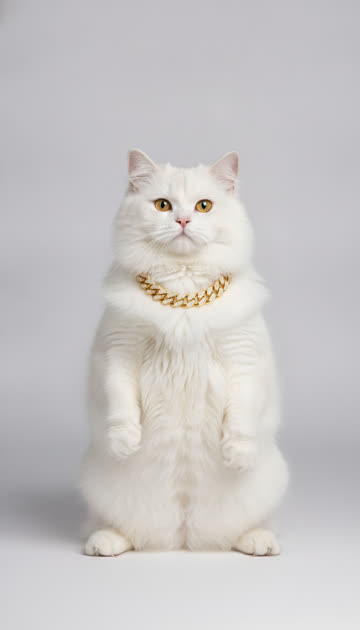
- Standing or sitting upright, facing the camera. The performers stand at the microphone, so an upright pose copies best. A cat sitting like a person, or a dog standing on its hind legs, is ideal.
- Face visible and sharp. Eyes, nose and mouth should be clear. A pet in profile, looking away or half hidden under a blanket gives the model little to work with.
- Full body or knee-up. Show the whole animal or at least most of it, including paws. The performers appear from head to toe in the wide shots.
- Good, even light and a plain background. Daylight near a window beats a flash photo in a dark room. The tool rebuilds the orange studio around the animal, so a calm background such as a wall or a sofa works best.
- No heavy filters, stickers or text on the photo. Remove cat-ear filters, sticker overlays and date stamps.
- Cartoon and toy characters are fine if they are clear and upright.
A good photo: your tabby sitting upright on a sofa, facing the camera in daylight, full body in the frame. A bad photo: a close-up of the cat's face sleeping, or two dogs on one photo, in a dark room with a flash.
What the tool will refuse: nudity, children and minors, ID documents, and photos of celebrities or of other people who did not agree. Photos of yourself, friends who agreed and pets are all fine.
What you get
You get a 15-second vertical 9:16 MP4 with no sound. The clip keeps the original performance move for move – every rap, hand move, cut and camera angle – with your two photos in place of the two performers. Post it on TikTok, Instagram Reels or YouTube Shorts. Because the clip is silent, add the trending "Hotel Lobby" sound inside the app: the clip starts on the same beat as the most-used version, so the moves line up. Switch on the AI-generated label when you post.
Price and what if it goes wrong
One video costs $8.99, one-time, no subscription; the price is on the button before you generate. If a generation fails, the credits come back automatically.
Your pet stays your pet
The tool is told to replace the two performers with the animals in your photos. Its replacement instruction says that each performer keeps the face, hair, body and outfit from their photo, and that if a photo shows an animal, it stays that animal and keeps its own fur, without the original clothes. In practice this means:
- A ginger cat stays ginger. It does not turn into a person in a jacket.
- A black Labrador keeps its black coat and its ears.
- The animal does not wear the original performers' clothes or gold chains.
- The moves – the hand gestures, the leaning into the microphone – are the original ones, applied to your animal's body.
The two example clips on the generator page use exactly this setup: two cat photos in, one clip out. A pose that looks a little like standing at a microphone is worth the extra minute.
Pet and owner combinations
The tool takes any pair of one person or pet per photo, so you are not limited to two cats:
| Combination | Left photo | Right photo | Works well when |
|---|---|---|---|
| Two cats | Cat one, upright | Cat two, upright | Both photos have similar distance and light |
| Cat and dog | Your cat | Your dog | Both are fully visible and not cropped |
| You and your pet | Selfie, full body | Pet, upright | You face the camera, no sunglasses |
| Two friends' pets | Pet A | Pet B | Send each other the photo, one person generates |
| Cartoon characters | Character one | Character two | Both are clear, full-body drawings |
Pick the order deliberately: the left photo is the performer who raps first, the right photo answers. If the clip comes out the wrong way round, swap the photos and generate again.
When a person is in the pair, use a photo from the knees up or full body, face on, without sunglasses.
Why it doesn't look right – and how to fix it
| Problem | Likely cause | Fix |
|---|---|---|
| The pet's face looks wrong | Face too small, turned away or blurry in the photo | Use a sharper photo where the face fills a good part of the frame, looking at the camera |
| One performer is weaker than the other | Photos have very different distance or light | Retake both at the same distance, in similar light |
| The animal looks like a different animal | Two animals in one photo | Crop or retake so only one animal is visible |
| Odd limbs or missing paws | Photo cut off at the shoulders or the pet lying down | Use a standing or sitting-upright photo with paws visible |
| Wrong performer raps first | Photos in the wrong boxes | Swap the left and right photo and generate again |
| Upload rejected | Photo shows a child, a celebrity, nudity or an ID | Use a different photo – these are not accepted |
| No music in the clip | The clip is silent by design | Add the "Hotel Lobby" sound inside TikTok or Instagram |
Where the cat trend came from
"Hotel Lobby" is a 2022 song by Quavo and Takeoff. According to Complex, the song was released on May 20, 2022 and the duo's studio performance was shared by the COLORS series in June 2022, with a single microphone in a flat orange room. The AI trend itself is from September 2026. Complex reports that the AI versions "exploded across TikTok in September," and that the first versions that went viral in early September were videos of two cats recreating the performance. On September 23, 2026, Quavo reposted the original performance. In his words on Facebook: "Aye Take we viral again The original!!!" (Complex, September 27, 2026).
The trend is not without criticism. Complex also quotes a fan on X calling it upsetting that people turned the performance into an AI meme. Takeoff was killed in November 2022, and that context is why pets, toys and original characters are the respectful way to join in. GenModelHub does not accept celebrity photos: use your own animals or people who agreed.
Complex does not name the creator of the first cat video, and "early September 2026" is the only date it gives.
How other routes handle pet videos
There are three common ways to make a pet version, and they differ in effort:
- A motion-transfer tool with a source clip. Tools such as Viggle or Higgsfield take a photo plus the original video and move your character with the same motion. You need to find and trim the source clip yourself, and each tool has its own credit or subscription system. See our notes on Viggle and the Hotel Lobby trend.
- A general video model with a prompt. You describe two cats at a microphone in an orange room and the model invents the motion. The scene is similar, the performance is not the original. See how Hotel Lobby prompts work.
- A browser tool that uses the original moves. That is the GenModelHub generator: two photos, no source clip, no prompt.
| Photo-plus-source-clip tool | Prompt in a video model | GenModelHub generator | |
|---|---|---|---|
| Input | One photo per character plus the original clip | Text prompt, sometimes one image | Two photos |
| Pet keeps its own look | Usually, depends on the photo | Often drifts | Yes, animals stay animals with their own fur |
| Original moves | Yes, from your source clip | No, invented | Yes, built in |
| Time | Several steps | Several attempts | A few minutes |
| Cost | Plan or credits, check the tool | Credits per try | $8.99 per video, one-time |
| Limits | Need a source clip | Moves differ from the trend | 15 s, vertical, silent; no children or celebrities |
FAQ
Can I make the Hotel Lobby AI video with my cat? Yes. Upload one upright, front-facing photo of your cat for each side – two cats, or one cat and one person – in the Hotel Lobby AI generator, and you get a 15-second vertical clip with the original moves.
Does my dog or cat stay a dog or cat in the video? Yes. A photo of an animal stays that animal and keeps its own fur; it does not turn into a human in the original performers' outfits.
How much does the pet video cost and how long does it take? One video is $8.99, one-time and without a subscription, and it takes a few minutes to generate. A failed generation returns the credits automatically.
Can I use one photo with both of my pets? No. Use two photos with one animal each. A shared photo makes it unclear which animal is the left or right performer.
Are my pet photos stored? The photos are sent to the generator to make your clip. How long uploads are kept is not stated in this article, so read the site's privacy policy before you upload anything private.
For the full walkthrough in more detail, see how to make the Hotel Lobby AI video, or start directly in the Hotel Lobby AI generator. The Higgsfield route is compared in Higgsfield Hotel Lobby.
Try the Hotel Lobby AI Generator
No app needed: two photos in, the original Hotel Lobby moves out – every rap, hand move and cut, with your two people – straight from your phone browser.
Generate a video