 GenModelHub
Hotel Lobby AI Prompt: What to Write to Recreate the Orange Booth (2026)
Updated 2026-10-18
A Hotel Lobby AI prompt is a text description of the viral orange-booth duet – two performers side by side at one hanging microphone in a flat orange studio – that you give to a general AI video model so it invents a similar clip. A prompt gives you the look of the scene but not the original performance; to keep the real moves you need a tool that replaces the performers in the original footage, such as GenModelHub's Hotel Lobby AI generator, which needs two photos and no prompt at all. GenModelHub is not affiliated with Quavo, Takeoff or COLORS.
How to make it with GenModelHub (3 steps, no prompt)
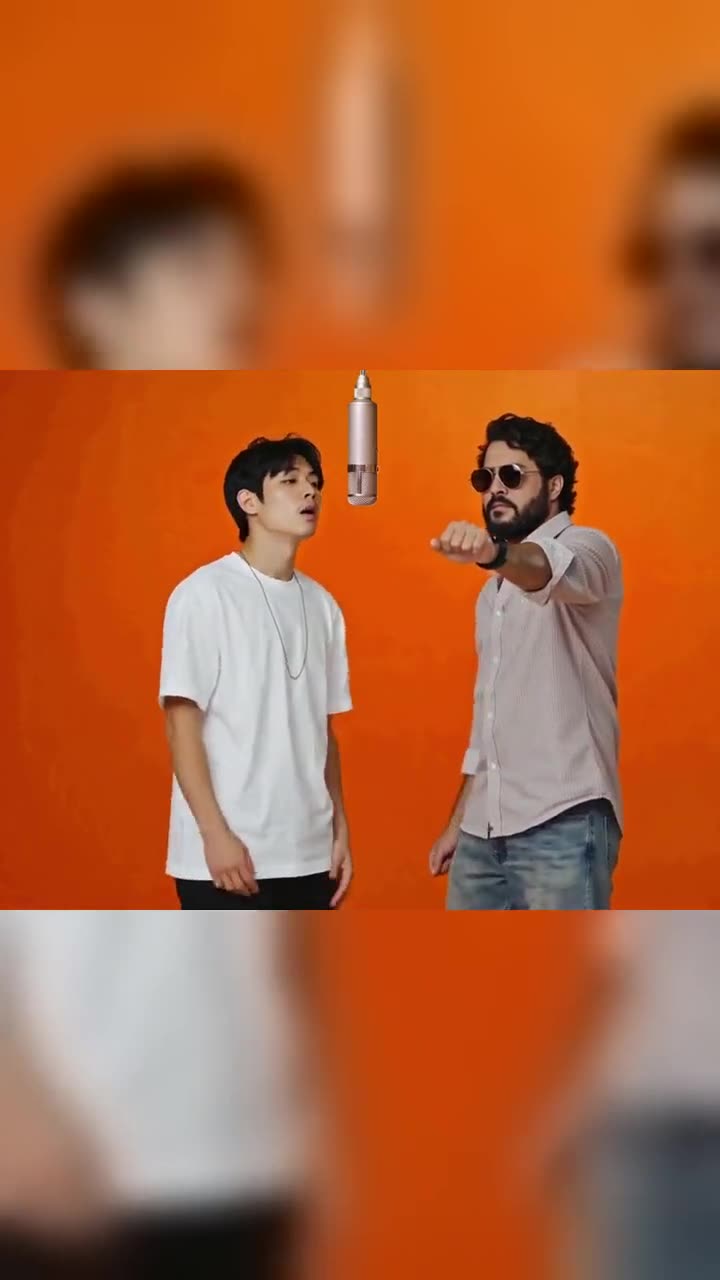
- Pick the effect. Open the Hotel Lobby AI generator in your phone or desktop browser. The scene and moves are already set, so there is no prompt box to fill.
- Upload two photos. Left box = left performer, right box = right performer. One person or pet per photo. It takes about a minute.
- Press "Make our orange booth battle". A few minutes later you can download a 15-second vertical MP4, then add the trending "Hotel Lobby" sound inside TikTok or Instagram.
Which photos to use
- Two photos, one person or pet in each – not a single photo of both.
- Standing, knee-up or full body, facing the camera.
- Sharp face, good light, no sunglasses or heavy filters. The face should be large enough to read clearly.
- Calm background. The tool rebuilds the orange studio around your people.
- Pets, toys and cartoon characters work if upright and clear.
- Rejected: nudity, children and minors, ID documents, celebrities, and other people who did not consent.
A good photo: a friend standing in a living room, full body, daylight, looking at the camera. A bad photo: a dark club selfie in sunglasses with three other people.
What you get and what it costs
You get a 15-second vertical 9:16 MP4 with no sound in which your two photos replace the performers and every rap, hand move, cut and camera angle of the original stays. Switch on the AI-generated label when you post. One video is $8.99, one-time, no subscription; if a generation fails, the credits return automatically. The Higgsfield-flavoured variant is on the Higgsfield Hotel Lobby page.
What a Hotel Lobby prompt needs to describe
If you use a general video model – a text-to-video or image-to-video generator – the prompt has to say what the camera sees. The original has a very specific look, and these elements are what people describe:
- The wall and floor. A seamless, saturated orange wall, with a lighter orange-yellow floor and no visible corners or props.
- The microphone. A single vintage studio microphone hanging from a cable at the top of the frame, between the performers.
- The performers. Two, side by side, facing the camera, in similar framing.
- The light. Flat, even studio light with no dramatic shadows.
- The camera. A static, front-on shot, with occasional cuts to a closer shot.
- The action. Taking turns rapping into the mic, confident hand gestures, small head nods.
- The format. Vertical 9:16, about 10–15 seconds, whatever the model supports.
An example prompt
This is an original example written for this article; adjust the characters to your own:
Vertical 9:16 video. Two characters stand side by side facing the camera in an empty studio with a saturated orange wall and a light orange floor. A single vintage silver microphone hangs from a cable between them. Flat, even studio light, no shadows. Static front camera. The left character raps into the microphone with relaxed hand gestures while the right character nods to the beat; then they swap. No text, no logos.
If the model accepts image input, attach one image of each character and name them: "the cat from image 1 on the left, the dog from image 2 on the right". Keep descriptions neutral and use your own characters rather than real public figures, which most platforms refuse.
Prompt tips that help on any model
- Describe the room before the people. Models fix the colour and light first, so state "saturated orange wall" early.
- Use one action per sentence. "Left character raps, right character nods" works better than a long story.
- Say what stays still. "Static camera, no zoom" prevents sweeping moves the original does not have.
- Add negative instructions inline. "No text, no logos, no extra people."
- Generate short first. Test five seconds before a long run; every attempt can cost credits.
- Skip real songs. Describe "a mellow hip-hop beat" at most; add the real sound inside TikTok or Instagram, where it is licensed.
Why prompts drift from the original moves
A text prompt tells the model what to draw, not how the original performance moved, so three things go wrong:
- The choreography is invented. The original has particular hand moves, a specific order of lines and cuts. A prompt can say "confident hand gestures", but the model chooses which ones, so the clip looks like a cousin of the trend, not the trend.
- The timing does not match the sound. The trending "Hotel Lobby" sound has a fixed beat. A prompt-built clip starts and cuts at random points, so the moves rarely land on the beats once you add the sound.
- The look wanders. Faces, fur and outfits change between attempts, and two performers are harder for a model than one. Pets turn into different animals, hands merge, the microphone moves.
This is why motion-transfer tools exist: they take the original footage as the motion source and replace the people. The GenModelHub generator works this way; its instruction to the model is to replace the two people with the people in the photos while keeping every move, hand gesture, mouth movement, cut, camera angle, the orange wall and the hanging microphone as they are. Each performer keeps the face, hair, body and outfit from their photo, and an animal stays that animal with its own fur.
Prompt-based vs. recast (two-photo) tools
| Prompt in a general video model | Recast tool (two photos) | |
|---|---|---|
| What you write | A scene and action description | Nothing |
| What you upload | Optionally one or two images | Two photos |
| Original moves | No, the model invents them | Yes, kept move for move |
| Matches the trending sound | Rarely | The clip starts on the same beat as the most-used version |
| Attempts to get a usable clip | Often several | Usually one |
| Control over scene | High – change the room, outfit, camera | Low – the orange booth is fixed |
| Cost | Credits per attempt, differs by model | $8.99 per video, one-time |
| Best for | Your own original take on the idea | The recognisable trend clip with your people |
Choose a prompt when you want an original variation, such as two robots in a pink booth. Choose the recast route when you want the clip that looks like the trend.
Where the format comes from
"Hotel Lobby" was released on May 20, 2022 by Quavo and Takeoff, and the COLORS series shared their studio performance in June 2022, per Complex. The AI versions began in early September 2026 with two cats recreating the performance. Quavo reposted the original on September 23, 2026, writing "Aye Take we viral again The original!!!". Complex names tools such as Starrd, Summrs and CapCut among those used for the AI versions; this article has not tested them.
Common problems when writing the prompt
| Problem | Cause | Fix |
|---|---|---|
| Wall is the wrong orange or has texture | Colour not specified | Write "saturated orange wall, seamless, no texture" |
| More than two performers appear | Prompt does not limit the count | Say "exactly two characters, no one else" |
| Microphone on a stand or in a hand | Hanging mic not described | Say "hangs from a cable from the top of the frame" |
| Camera moves a lot | No camera instruction | Add "static front camera" |
| Animal turns into a person | Prompt says "performers" | Say "a cat" or "a dog" and attach its photo |
| Clip doesn't fit the sound | Moves are invented | Use a recast tool, or trim the clip to the beat |
FAQ
What prompt do I use for the Hotel Lobby AI video? Describe a saturated orange studio wall, one hanging vintage microphone, two characters side by side, flat studio light and a static front camera, then add what each character does. The example prompt above is a starting point.
Do I need a prompt in the GenModelHub Hotel Lobby generator? No. You upload two photos and press the button; the original moves are built in.
Why does my AI video not move like the original Hotel Lobby clip? A prompt only describes the scene, so the model invents the choreography. Tools that replace the performers in the original footage keep the real moves.
How long does it take and what does it cost? A clip takes a few minutes and one video costs $8.99, one-time. A failed generation gives the credits back.
Can I put a celebrity's face in my prompt? No. GenModelHub refuses celebrity photos and prompts about real public figures; use yourself, friends who agreed, pets or original characters.
For pets, see Hotel Lobby with your cat or dog; for the Viggle route, see Viggle AI Hotel Lobby.
Try the Hotel Lobby AI Generator
No app needed: two photos in, the original Hotel Lobby moves out – every rap, hand move and cut, with your two people – straight from your phone browser.
Generate a video