 GenModelHub
How to Post the Hotel Lobby Trend on TikTok With the Sound (2026)
Updated 2026-10-18
To post the Hotel Lobby trend on TikTok with the sound, you upload your finished video, tap Sounds in the editing screen, search for "Hotel Lobby", pick the most-used version, drag it so it starts on the same beat as the clip, and switch on the AI-generated content label before posting. The video itself can come from GenModelHub, which makes a silent 15-second vertical clip from two photos so that you add the licensed sound inside the app. GenModelHub is not affiliated with TikTok, Instagram, COLORS, Quavo or Takeoff.
How to make the clip with GenModelHub (3 steps)
- Pick the effect. Open the Hotel Lobby AI generator in your phone browser; no app is needed.
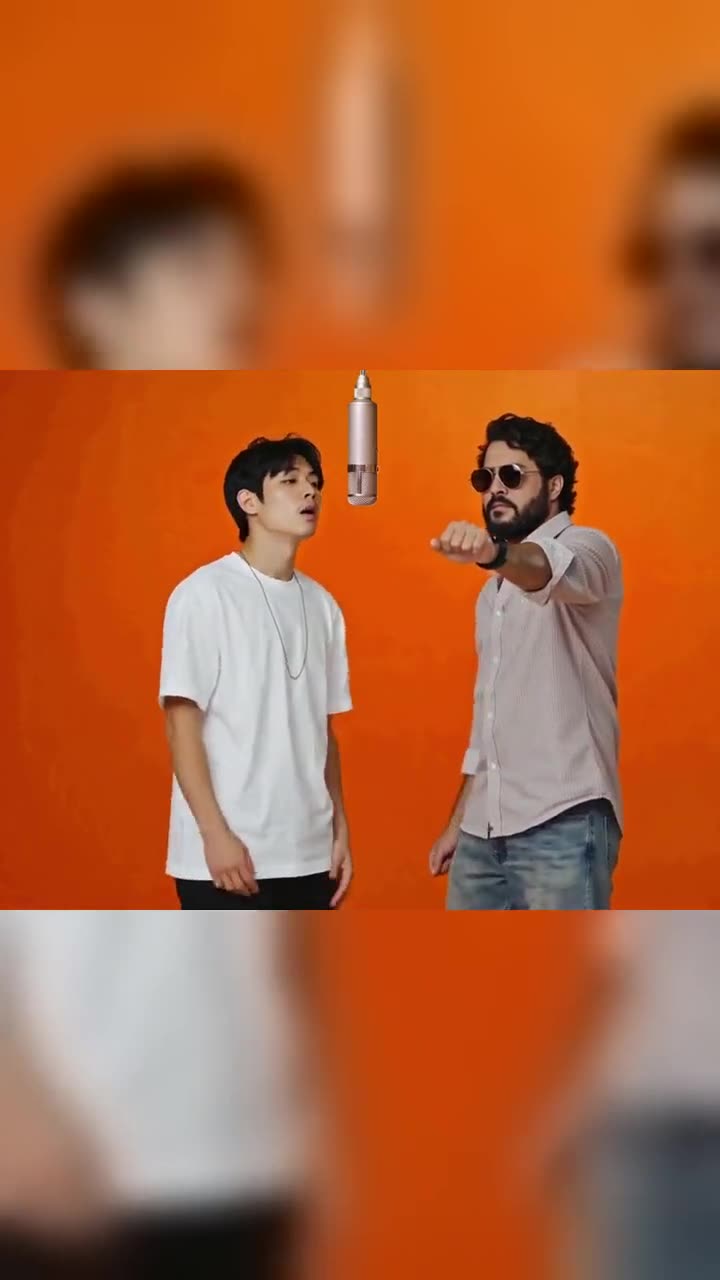
- Upload two photos and generate. Tap the left and right boxes, add one photo in each, then tap "Make our orange booth battle". Your two replace the performers in the original Hotel Lobby moves, with every rap, hand move, cut and camera angle kept. It takes a few minutes.
- Download the MP4. You get a 15-second vertical 9:16 clip with no sound, then you add the sound in TikTok or Instagram as described below.
Which photos to use
- Two photos, one person or pet in each. Left photo = left performer.
- Standing, knee-up or full body, facing the camera, with the person filling about two thirds of the photo's height.
- No sunglasses, masks or beauty filters; clear face, good light, plain background if possible.
- Pets, toys and cartoon characters are fine.
- Not allowed: nudity, children, ID documents, celebrities, or anyone's photo without their consent.
- JPG, PNG or WebP, up to 10 MB.
A good photo: a friend standing outdoors in daylight, full body, looking at you. A bad photo: a cropped, dark selfie with sunglasses or a group shot.
Why the clip has no sound
The silence is on purpose. The trending track is licensed inside TikTok and Instagram, so adding it there is the safe way to use it; uploading a copied song file is not the same as using the in-app library. The clip starts on the same beat as the most-used version of the sound, so the raps and moves line up once the sound begins at the start of the track.
Price
One video is $8.99, one-time, no subscription, shown on the button before you generate. If a generation fails, the credits come back automatically. Example clips are on the generator page, and the same tool is available from the Higgsfield Hotel Lobby page.
Add the trending sound in TikTok (step by step)
TikTok's menus change between versions, so the labels below may differ slightly on your phone. A routenote.com guide, written in 2021, describes the same flow and reminds you its labels may have moved, so treat the names as a guide.
- Upload the clip. In TikTok tap +, choose the downloaded MP4 from your gallery, trim it if you want, then tap Next.
- Open Sounds. Tap Sounds (or Add sound) and then More to open the full library.
- Search "Hotel Lobby". Pick the version with the most videos. According to the Starrd guide, the sound has over 428,000 TikTok videos; another provider's instructions tell you to add the "original sound - COLORS" track from 0:00. Preview a few and choose the one that matches the clip's rhythm.
- Start it on the beat. TikTok automatically picks a song's most popular section, so check where it starts. Tap the scissors icon and drag the sound wave until the first rap line lands when your first performer starts. Our clip is built to begin on the same beat as the most-used version, so the sound should start at the beginning of the track (0:00) in most cases.
- Set the volume. The clip is silent, so you only need the added sound; open Volume and push the added-sound slider up.
- Switch on the AI label. Details below.
- Post. Add a caption and the hashtags you want. Keep the clip at its full 15 seconds so the sound doesn't cut off.
If the voices land a fraction late or early, trim the sound's start by a split second rather than the video, since the video's cuts are fixed to the original moves.
TikTok's AI-generated label: what the rules say
TikTok says: "We require creators to label AIGC that shows realistic-appearing scenes or people." (TikTok transparency page). The same page says TikTok provides a built-in tool for creators to tag their own AI-generated uploads and that it automatically labels content made with TikTok's own AI effects. It also reads Content Credentials, the C2PA metadata standard, to label content made on certain other platforms.
An earlier TikTok newsroom post, dated 9 May 2024, says TikTok has "required creators to label realistic AIGC for over a year" and that more than 37 million creators had used its labeling tool (TikTok newsroom).
A Hotel Lobby clip shows photorealistic people performing in a studio, so you should treat it as realistic AI-generated content and label it. A secondary summary of TikTok's guidance (pixo.video, which says to confirm on TikTok's own pages) lists the mobile steps as: tap Add post (+), upload, tap Next, tap More options (...) and turn on AI-generated content, then post. It also reports that TikTok may remove unlabeled AI-generated content, can limit For You feed eligibility for guideline violations, and states that the setting "won't affect the distribution of your video as long as it doesn't violate our Community Guidelines". Auto-applied labels cannot be removed. Check TikTok's AI-generated content help page for the current text.
Do not use real celebrities' faces, and do not label unaltered footage as AI; that is a different violation.
Instagram Reels equivalent
Reels works the same way, with the sound added inside the editor:
- Upload the clip. Tap +, choose Reel, select the MP4 and tap Next.
- Add the audio. Tap the music icon or Add audio, search "Hotel Lobby" and pick the most-used version. Use the slider to line the first beat up with the start of the clip, and mute the original audio if one is present.
- Disclose the AI. On the final screen open More options or the advanced settings and turn on the AI label or disclosure control. Instagram's wording changes by app version and country.
- Share. Post to Reels, and if you wish also to Feed.
For the rules: Meta says it adds "AI info" labels when people disclose AI-generated uploads, in a policy page first published on 5 April 2024 and updated through 12 September 2024 (Meta). Meta renamed the earlier "Made with AI" label to "AI info" on 1 July 2024. The practical step is the same as on TikTok: tick the disclosure when you post.
Why it doesn't look right: fixes
| Problem | Fix |
|---|---|
| Sound starts too early or late | Trim the sound with the scissors/slider, not the video |
| Rap lines drift out of sync | Use the most-used version of the sound, starting at 0:00 |
| Sound is missing or different | Use the in-app library, not a copied song file |
| The exact sound isn't listed | Try another version of "Hotel Lobby" or the "original sound - COLORS" entry |
| Face looks soft in the clip | Redo with a sharper full-body photo without filters |
| Wrong performer raps first | Swap the photo order and generate again |
| Clip uploaded with black bars | Export again at 9:16; our clip is already vertical |
Background: where the trend comes from
"Hotel Lobby" is a song by Unc & Phew, the duo name used by Quavo and Takeoff, released on 20 May 2022. According to the Starrd guide, COLORS posted the performance in June 2022, with the orange booth and the single hanging microphone, and reposted it in April 2025, October 2025 and June 2026. The AI version took off on TikTok in September 2026: The Tab reported on 25 September that users were inserting themselves, characters and animals into the video. The tool named there, Summrs AI, describes its template with "Put yourself in the Hotel Lobby COLORS performance" (The Tab). For the long version, read how to make the Hotel Lobby AI video and the Migos AI trend.
Ways to get the sound onto the clip, compared
| Way | Input | Result | Time | Cost | Limits |
|---|---|---|---|---|---|
| Add the sound inside TikTok | Silent 15 s clip | Licensed trending sound, label in-app | 2 minutes | Free in the app | Menu names change |
| Add it inside Instagram Reels | Silent 15 s clip | Same, with AI disclosure | 2 minutes | Free in the app | Menu names change |
| Template apps that include the audio | Two photos | Clip with the original audio track | Minutes | Varies; see our comparison | Rights depend on the app |
| Kapwing template | Generated clip dropped into a template | Song section already on the timeline | Longer | Kapwing credits | Extra steps (see Kapwing's guide) |
| GenModelHub clip, then app sound | Two photos | 15 s, 9:16, no sound | A few minutes | $8.99 per video | You must add the sound yourself |
FAQ
How do I add the Hotel Lobby sound to my AI video on TikTok? Upload the video, tap Next, tap Sounds, search "Hotel Lobby", choose the most-used version and drag it to start on the first beat. Then set the volume and switch on the AI-generated content label before you post.
Why does the GenModelHub clip have no sound? Because the trending song is licensed inside TikTok and Instagram, so you add it there. The clip starts on the same beat as the most-used version, so it lines up when the sound starts at the beginning.
Do I have to label the video as AI-generated? Yes, treat it that way. TikTok says it requires creators to label AI-generated content that shows realistic-appearing scenes or people, and a Hotel Lobby clip of real-looking people qualifies.
Which photos work best, and how long does it take? Two photos, one person or pet in each, standing and facing the camera in good light without sunglasses or filters. A clip takes a few minutes and costs $8.99 per video.
Are my photos stored? Photos are used to make the video; the privacy policy in the site footer explains retention. Only upload photos of people who agreed.
Make the clip first: Hotel Lobby AI generator.
Try the Hotel Lobby AI Generator
No app needed: two photos in, the original Hotel Lobby moves out – every rap, hand move and cut, with your two people – straight from your phone browser.
Generate a video