 GenModelHub
Viggle AI Hotel Lobby: How to Make the Trend With Viggle or Two Photos (2026)
Updated 2026-10-18
"Viggle AI Hotel Lobby" means recreating the viral orange-booth duet with Viggle, an AI character-animation tool that makes a character from a still photo copy the movements of a reference video. People search it because Viggle's approach – photo plus motion clip – is the classic way to put your own face into a dance or rap meme. A shorter route for this specific trend is a browser tool that already contains the original Hotel Lobby moves, such as GenModelHub's Hotel Lobby AI generator, where you only upload two photos. GenModelHub is not affiliated with Viggle.
How to make it with GenModelHub (3 steps)
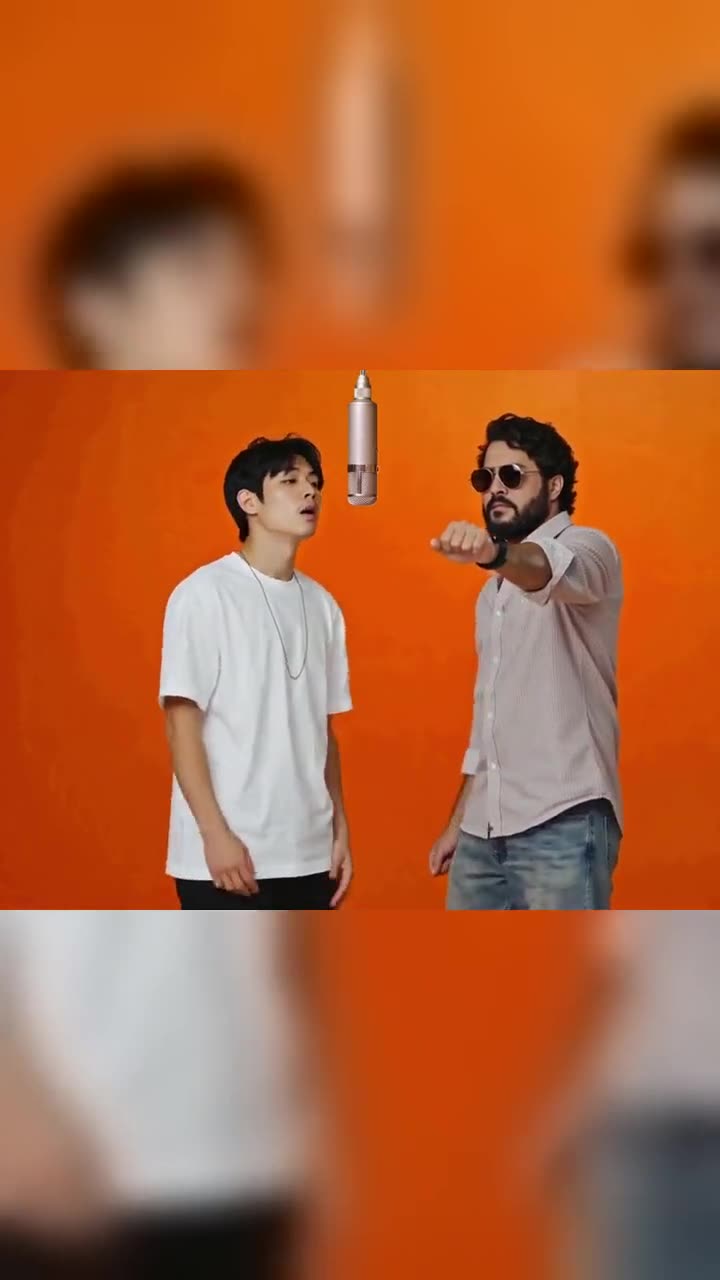
- Pick the effect. Open the Hotel Lobby AI generator in any phone or desktop browser. No app, no source video, no prompt.
- Upload two photos. Add one photo in the left box (the left performer) and one in the right box (the right performer). Allow about a minute.
- Press "Make our orange booth battle". It takes a few minutes. Download the 15-second MP4, then add the trending "Hotel Lobby" sound inside TikTok or Instagram.
Which photos to use
- Exactly two photos, one person or pet in each – not one photo of both.
- Standing, knee-up or full body, facing the camera. The performers appear head to toe in the wide shots.
- Clear face in good light. No sunglasses, masks or heavy filters; the face should be sharp and not tiny.
- Plain background. The tool rebuilds the scene as the orange studio, so a wall or a quiet room works best.
- Pets, toys and cartoon characters are fine if they are upright and clear.
- Photos that will be rejected: nudity, children and minors, ID documents, celebrities, and other people who did not agree.
A good photo is a friend standing in a hallway, full body, facing the camera, in daylight. A bad photo is a group selfie cropped at the chin or a close-up in sunglasses under a night-club light.
What you get, and the price
You get a 15-second vertical 9:16 MP4 with no sound, with your two photos replacing the performers while every rap, hand move, cut and camera angle of the original stays. Switch on the AI-generated label when you post. A video costs $8.99, one-time, no subscription, and a failed generation gives the credits back automatically. The main page is the Hotel Lobby AI generator; the Higgsfield-flavoured variant is here.
What Viggle actually does
Viggle is a motion-transfer tool from a Canadian startup. According to TechRadar's explainer, it is built on a 3D model called JST-1, and it cannot create video from text: every result needs a still image and a reference video. The main modes it describes are:
- Mix. Upload a character image and a motion video, then press "Viggle This!". The character either appears on a chosen background or is masked into the existing video.
- Multi. Replaces several characters in one scene.
- Move. Upload a motion video and select the figure in a still image to animate it.
Viggle's own site currently presents a wider platform – a Meme Maker (swap a character, add motion to a character, swap several characters, swap in real time), PINOC for capturing motion from a phone video, games and an API. A third-party page last updated in August 2026 also lists Mic, Rap and Live modes and clips of up to roughly 15 seconds. Viggle changes its product often, so check which modes are shown in the app today.
The relevant point for the Hotel Lobby trend: Viggle moves characters, it does not come with the Hotel Lobby scene. You must supply the reference video, and the result is only as good as that reference. Single-person dances with a static camera work best; the Hotel Lobby original has two performers, hand gestures and cuts between wide and close shots, which is why this trend is harder than the average Viggle meme.
Viggle's free plan, watermark and price
- Free plan: TechRadar describes up to five videos per day in relaxed mode, 720p output, and upload limits of one minute and 50 MB. Another 2026 review says the same five-videos-a-day figure.
- Watermark: The free output carries a watermark; paid plans remove it. A March 2026 Flowith analysis lists Free as watermarked and Pro, Live and Max as watermark-free.
- Paid plans: The published prices differ by source and date. TechRadar quotes Pro at $9.99 per month with 80 credits; a page updated in August 2026 lists Pro at $4.99 with 80 credits, Live at $9.99 with 200 and Max at $31.99 with 800. Viggle's own pricing page was not readable when this article was written, so look at viggle.ai for the current price.
How people make the Hotel Lobby trend with Viggle
There is no official Viggle Hotel Lobby button that we could verify. The usual workflow, based on how Viggle's modes are documented, looks like this:
- Get a reference video. You need the orange-booth performance as a video file. TechRadar says Move mode works best with a reference against a plain background; the original has two performers and quick cuts, which is harder than a single-person dance.
- Choose a mode. Use Mix or Multi, depending on whether you replace one or both performers.
- Upload a full-body photo of each person or character. Viggle's free meme generator is described as working best with a full-body photo.
- Generate. The free plan queues relaxed-mode jobs; paid credits are for fast mode.
- Fix the cuts. The original clip switches between wide and close shots. Motion transfer can lose the second performer when the framing changes, so many creators cut the clip into pieces first.
- Add the sound and post. Remove the watermark with a paid plan if you are posting widely, then add the "Hotel Lobby" sound in TikTok or Instagram and use the AI label.
The first step carries a copyright question: the performance belongs to its owners, and Complex reports that some fans dislike the AI memes. Use your own judgment about the footage, and use photos of yourself, friends who agreed, or pets and characters.
Viggle vs. a two-photo Hotel Lobby tool
| Viggle | GenModelHub Hotel Lobby generator | |
|---|---|---|
| What you upload | Character photo plus a reference video | Two photos |
| Source clip | You find and supply it | Built in, the original moves |
| Two performers | Multi mode or a second pass | Always two, left and right |
| Output length | Depends on your reference clip | 15 seconds, vertical 9:16 |
| Sound | Depends on settings | None, add the trending sound in the app |
| Free option | Watermarked, five per day (per TechRadar) | None; $8.99 per video |
| Watermark | Free output has one | None on paid videos |
| Account / app | Web, iOS and Android apps | Phone or desktop browser |
| Cost | Subscription plans | $8.99 one-time per video |
Viggle gives you more control and a free plan to experiment, and it is useful for many other memes besides this one. The Hotel Lobby generator does one thing: it gives you the finished format in one step and charges per video, and a failed generation refunds the credits automatically. If you only want this trend, the two-photo route saves the hunt for a reference clip; if you plan to make many different dance and meme clips, Viggle's free plan is worth trying first.
Common problems with Viggle Hotel Lobby clips
| Problem | Cause | Fix |
|---|---|---|
| The second performer disappears | Reference video has cuts or overlaps | Split the reference at the cuts, or use the two-photo tool |
| Face and body look pasted on | Photo cropped or low resolution | Use a sharp, full-body photo |
| Watermark in the corner | Free plan | Upgrade or use a tool without one |
| Wrong beat on the sound | Clip trimmed differently | Match the start to the song's first beat in the app |
| Output is 720p | Free-plan limit (per TechRadar) | Paid plan for 1080p |
Where the trend comes from
"Hotel Lobby" was released on May 20, 2022 by Quavo and Takeoff, and the duo's COLORS studio performance in June 2022 has the orange room and single microphone, according to Complex. The AI wave began in early September 2026 with videos of two cats recreating the performance, and then spread to friends, characters and public figures. Quavo reposted the original on September 23, 2026 with: "Aye Take we viral again The original!!! #HOTELLOBBY".
FAQ
Can Viggle make the Hotel Lobby trend? Yes, in principle. Viggle can move a character photo with a reference video, so with a clip of the orange-booth performance you can apply it to your own character.
Is Viggle free for Hotel Lobby videos? Viggle has a free plan with watermarked, 720p output limited to about five videos a day, according to TechRadar. Paid plans remove the watermark. Check viggle.ai for current prices.
What is the easiest way to make a Hotel Lobby AI video without a source clip? Use a tool that already includes the original moves. In the Hotel Lobby AI generator you add two photos and get a 15-second vertical clip for $8.99.
Does the GenModelHub clip have sound or a watermark? The clip has no sound, so add the trending sound inside TikTok or Instagram, and paid videos carry no watermark.
Is GenModelHub part of Viggle? No. GenModelHub is independent and not affiliated with Viggle.
Related: Hotel Lobby video with a cat or dog and Hotel Lobby prompts.
Try the Hotel Lobby AI Generator
No app needed: two photos in, the original Hotel Lobby moves out – every rap, hand move and cut, with your two people – straight from your phone browser.
Generate a video