 GenModelHub
How to Make the Hotel Lobby AI Video With One Photo (2026)
Updated 2026-10-18
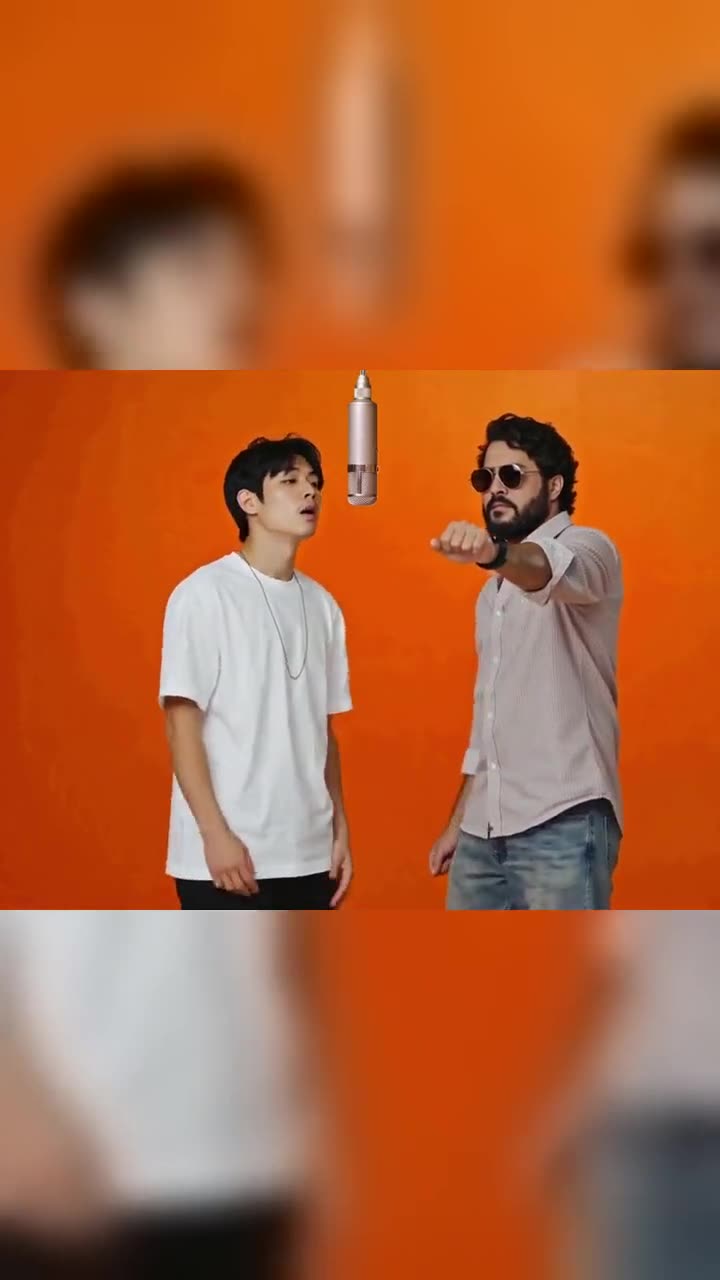
Making the Hotel Lobby AI video with one photo means starting from a single picture and getting the two-performer orange-booth clip out of it, and whether that works depends on the tool: most generators want one photo per performer, a few accept one picture of both people. GenModelHub needs two photos, one person or pet in each, but if all you have is one picture of two people, you can crop it into two on your phone in under a minute. GenModelHub is not affiliated with Quavo, Takeoff, COLORS, TikTok or any tool named below.
How to make it with GenModelHub (3 steps)
- Pick your two photos. Tap the left box and the right box in the Hotel Lobby AI generator and add one photo in each. The left photo becomes the left performer, the right photo the right one. This takes about a minute.
- Press "Make our orange booth battle". Your two people replace the performers in the original Hotel Lobby moves. Every rap, hand move, cut and camera angle stays as it is. It takes a few minutes, and the page runs in your phone browser, so there is no app to install.
- Download and post. Save the 15-second clip, then add the trending "Hotel Lobby" sound inside TikTok or Instagram and switch on the AI-generated label (details in our guide to posting with the sound).
Which photos to use
- Two photos, one person or pet in each. Not one photo of both of you. The left photo is the left performer.
- Standing, knee-up or full body. The performers dance and rap, so the tool needs to see arms and legs, not only a face.
- Facing the camera, face clearly visible. Step back so the whole person fills about two thirds of the photo's height, with the face clearly visible rather than a tiny dot or a close-up.
- No sunglasses, masks or heavy filters. Beauty filters and face-reshaping effects change the face the tool copies.
- Good light, plain background. Daylight or an even indoor light beats a dark club.
- Pets and cartoon characters are fine. A cat standing on a sofa or an original illustrated character works; the pet keeps its own fur and does not get the original clothes.
- Your own photos or photos of people who agreed. Photos with nudity, children, ID documents, celebrities or other people's pictures used without consent are rejected or not allowed.
- JPG, PNG or WebP, up to 10 MB.
A good photo: a friend standing in a hallway, full body, facing you, daylight, nothing in front of the face. A bad photo: a close-up selfie with sunglasses and a filter, or a group shot where it is unclear who the performer is.
What you get
A 15-second vertical 9:16 MP4 with no sound, made for TikTok, Instagram Reels and YouTube Shorts. It takes a few minutes. The silence is deliberate: you add the trending sound inside the app, where it is licensed, and the clip starts on the same beat as the most-used version, so the raps and moves line up.
Price, and what if it goes wrong
One video costs $8.99, one-time, no subscription, and the price is shown on the button before you generate. If a generation fails, the credits come back automatically. You can look at the example clips on the generator page before paying. If you came from a Higgsfield search, the Higgsfield Hotel Lobby page explains that route next to ours.
"But I only have one photo": three ways out
Option 1: crop one photo into two
This works if the picture shows two people standing next to each other with a bit of space between them, head to knee or head to toe.
On an iPhone: open the photo in Photos, tap Edit, tap the Crop icon, drag the frame so it covers only the left person (give them a little air above the head and below the feet), tap Done, then choose Save as New Photo if it offers it. Repeat for the right person.
On Android (Google Photos): open the photo, tap Edit, choose Crop, drag the corners around one person, tap Save copy. Repeat for the second person.
Check each crop before uploading: one person per image, no stray arm or shoulder of the other person at the edge, and the person still large enough to be clear. If the original photo is a close selfie of two faces squeezed together, cropping will give you two tiny, cut-off faces and the result will look worse than a fresh photo. In that case, take two new photos instead; it takes less time than redoing a bad clip.
Option 2: take a second photo
The fastest fix for a good result: ask your friend or partner to stand in front of a plain wall, take a full-body photo of them, then take one of yourself the same way. Two photos taken the same way, in the same light, match better than a crop from a party picture.
Option 3: use a solo version or a second character
If it is just you, the second performer can be a pet, a toy, a drawing or an original character, which is also the likeness-free way to join the trend. Some other tools offer a dedicated solo mode (see below). In ours, both slots are filled, so the simplest solo trick is a second photo of a pet or character.
Why it doesn't look right: fixes
| Problem | Likely cause | Fix |
|---|---|---|
| A face looks blurry or changes | Small face after cropping, or a heavy filter | Use a larger crop or a new full-body photo without filters |
| Two people appear as one, or one performer copies the other | Both photos show both people | Use one person per photo |
| Legs or arms missing | Photo cropped at the chest | Use knee-up or full body, with room above the head |
| Sides swapped | Photos added in the wrong boxes | Swap them; left photo is the left performer |
| Wrong colors or gloomy look | Dark photo | Retake in daylight or near a window |
| Pet doesn't look like your pet | Photo from a strange angle | Use a side or front view with the whole body visible |
If a clip fails to generate at all, the credits are returned automatically and you can try again with new photos.
What other tools do with one photo
Tools differ a lot here, and most of them are described on their own pages as follows (all details as stated by those pages on 18 October 2026, and prices and rules change):
- Renoise says you can use "one photo of the two of you" or one photo per person; the second slot is optional. Its page states your first clip is free, watermarked and silent, at 480p and 4 seconds by default. Source: renoise.ai/features/hotel-lobby-ai.
- LightX lists a solo-spotlight variation ("one person standing center frame, waist-up") but advises against "a single group photo" for the duo version. Source: lightxeditor.com.
- Dreamina (CapCut) documents a two-photo workflow with Seedance 2.5: one subject per photo, you decide who stays left and right, then you check that faces don't merge. It does not describe a one-photo route. Source: dreamina.capcut.com.
- Starrd says most of its dance templates take one photo, but the Hotel Lobby template takes two, "because the COLORS format is a back-and-forth between two performers"; it calls a group shot a common mistake. Source: getstarrd.app.
- Kapwing with Seedance 2.5 builds a character sheet from each photo; for a single person you can create two sheets of the same person or use a different character for the second performer. Source: kapwing.com.
The pattern is consistent: the format is a duo, so a model needs to know who is who. A single photo of two people works in some tools because they place you side by side, at the cost of likeness. Renoise's own page admits that with two separate photos "the likeness can drift slightly" because the model places you side by side, while one shared photo keeps faces closest to real. That is a trade-off: a shared photo keeps the faces together, separate photos give each performer more space and freedom. GenModelHub chose separate photos because it puts your two people into the original moves, one per side.
Background: where the format comes from
The Hotel Lobby AI trend restages a COLORS studio performance of "Hotel Lobby" by Unc & Phew, the duo name under which Quavo and Takeoff released the song on 20 May 2022. According to the guide at getstarrd.app, COLORS posted the performance in June 2022 and reposted it in April 2025, October 2025 and June 2026. The AI version went viral in September 2026: The Tab reported on 25 September 2026 that TikTok users were inserting themselves, characters and animals into the video. The orange booth, the single hanging microphone and the two performers trading lines are what everyone is copying, which is why most tools insist on two inputs. For the longer story, see our Hotel Lobby trend guide and the Migos AI trend.
One-photo vs two-photo approaches compared
| Approach | Input | Result | Time | Cost | Limits |
|---|---|---|---|---|---|
| GenModelHub | Two photos, one performer each | 15 s, 9:16, original moves, no sound | A few minutes | $8.99 one video, no subscription | Needs two photos; no celebrities or children |
| Renoise | One shared photo or two | Short clip; defaults 4 s, 480p | Minutes | First clip free with watermark, then plans from $20/month | Free clip is silent and watermarked |
| Dreamina Seedance 2.5 | Two photos plus your own prompt | Prompted video, 9:16 | Minutes | Plans from $15/month (first-month discounts) | You write the prompt and check consistency |
FAQ
Can I make the Hotel Lobby AI video with just one photo? Not with one photo of two people in GenModelHub, which wants one photo for each performer. Crop the picture into two images first, or take one new photo of each person; some other tools do accept a shared photo.
How do I split one photo into two photos on my phone? Open the photo in Photos on iPhone or Google Photos on Android, tap Edit, choose Crop, frame one person and save as a copy, then repeat for the second person. Keep each person large in the frame and avoid the other person's arm in the crop.
Can I make a solo Hotel Lobby video? Yes, by putting a pet, toy or original character in the second slot. A few tools, such as LightX, list a dedicated solo version as an option.
How long does it take and what does it cost? A few minutes, and one video is $8.99 one-time with no subscription. The price is shown on the button before you generate, and failed generations are refunded automatically.
Are my photos stored? The photos are used to make your video. Check the privacy policy linked in the site footer for how long files are kept, and do not upload photos of people who have not agreed.
Ready to try it? Start in the Hotel Lobby AI generator.
Try the Hotel Lobby AI Generator
No app needed: two photos in, the original Hotel Lobby moves out – every rap, hand move and cut, with your two people – straight from your phone browser.
Generate a video